
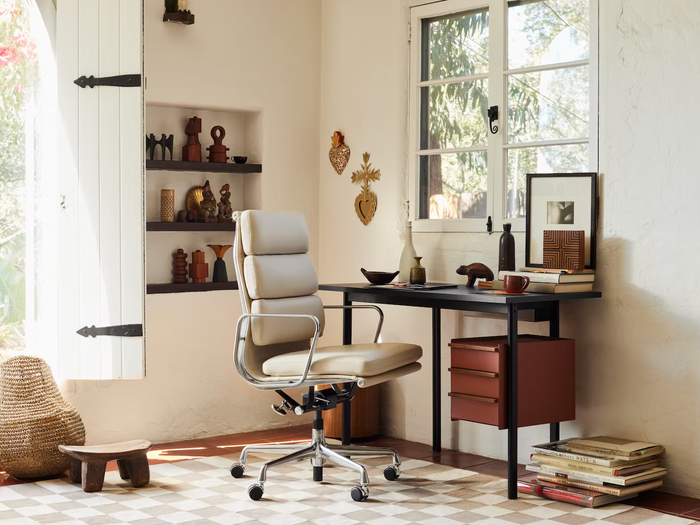

The modern home office has evolved from a temporary dining table arrangement into a vital environment for long-term health and professional productivity. Spending eight or more hours a day seated at a desk places significant physical demands on the human body. Without proper support, poor posture leads to chronic musculoskeletal issues, lower back strain, neck stiffness, and persistent fatigue. Investing in carefully selected ergonomic furniture is essential to preserving spinal health and maintaining high energy levels throughout the workday.
Selecting ergonomic furniture requires an understanding of biomechanics and human anatomy. Rather than forcing your body to adapt to static furniture, true ergonomic design customizes the workstation to fit your unique physical proportions. From dynamic lumbar support to motorized standing desks, equipping a home workspace with the right tools transforms how you feel and work.
The Core Fundamentals of Workplace Ergonomics
Ergonomics centers on maintaining a neutral body posture. In a neutral posture, your joints are naturally aligned, reducing stress on muscles, tendons, and the skeletal system. Achieving this state requires balancing structural support with natural freedom of movement.
-
Ninety-Degree Joint Alignment: Your knees, hips, and elbows should rest at approximately ninety to one hundred ten-degree angles when seated.
-
Level Line of Sight: The upper third of your primary monitor screen should rest directly at eye level to prevent forward head tilt.
-
Unconstrained Foot Placement: Your feet must plant flat on the floor or rest securely on an angled footrest to relieve pressure on the underside of your thighs.
-
Wrist Neutrality: Forearms should rest parallel to the floor, allowing hands and wrists to extend naturally across input devices without bending upward or downward.
Prolonged static posture, even when well aligned, reduces blood circulation and causes muscular exhaustion. High-quality ergonomic furniture encourages micro-movements throughout the day, allowing you to alter positions without breaking your workflow focus.
Selecting the Right Ergonomic Office Chair
The office chair is the cornerstone of any ergonomic workspace. A standard chair offers fixed dimensions that rarely match individual body shapes. A true ergonomic chair provides extensive adjustment points to support continuous micro-adjustments.
Lumbar Support and Spine Alignment
The human spine possesses a natural S-curve. Standard chairs often allow the lower back to slump, flattening the lumbar curve and increasing pressure on spinal discs. Look for a chair with an adjustable lumbar support system that lets you alter both height and depth. This ensures the lumbar cushion fits snugly into the small of your lower back, maintaining your spine’s natural curvature.
Essential Adjustability Features
-
Seat Height: Pneumatic height adjustment allows you to position the seat so your feet lie flat while your thighs remain parallel to the floor.
-
Seat Depth Slider: A seat depth adjustment mechanism slides the seat pan forward or backward. You should aim for a gap of two to three fingers between the front edge of the seat cushion and the back of your knees to preserve popliteal blood circulation.
-
3D or 4D Armrests: Armrests should adjust in height, width, depth, and pivot angle. Supporting the weight of your forearms prevents shoulder shrugging and reduces strain across the upper back and neck muscles.
-
Synchro-Tilt Mechanism: High-end office chairs utilize synchro-tilt mechanics, where the backrest reclines at a higher ratio than the seat pan tilts. This allows you to lean back while keeping your feet grounded and your spine fully supported.
Cushioning, Breathability, and Material Science
Seat cushion material impacts comfort over extended work sessions. High-density molded foam offers durable support without flattening out over time. Alternatively, breathable mesh backrests distribute weight evenly and encourage airflow, preventing heat buildup during warmer months.
Standing Desks and Height Adjustable Workstations
Sedentary behavior for extended periods increases health risks and contributes to sluggish energy levels. Height-adjustable sit-stand desks allow you to transition smoothly between sitting and standing postures throughout the day.
Electric Dual Motor vs Manual Sit Stand Desks
When evaluating height-adjustable desks, movement mechanism and stability are critical factors.
-
Electric Dual-Motor Desks: Powered by separate motors attached to each leg frame, dual-motor desks offer quiet, fluid height transitions and higher weight capacities. They typically feature programmable memory keypads, allowing you to save precise sit and stand height presets.
-
Single-Motor Desks: These utilize a drive shaft connecting one motor to both legs. They are generally less expensive but offer lower weight capacities, slower adjustment speeds, and slightly louder operation.
-
Manual Crank Desks: Manual desks rely on hand cranks to adjust height. While budget-friendly and independent of power outlets, the physical effort required often deters users from switching positions frequently.
Surface Dimensions and Frame Stability
A functional desk surface should measure at least forty-eight inches wide by thirty inches deep to accommodate monitors, keypads, and note-taking areas comfortably. Frame crossbars and heavy gauge steel legs prevent wobble, particularly when the desk is extended to its maximum standing height.
Essential Ergonomic Accessories for Complete Alignment
Furniture provides the primary framework, but specialized accessories fine-tune your home office environment for complete physical alignment.
Monitor Arms and Visual Ergonomics
Placing a monitor directly on a desk surface usually forces you to look downward, straining the neck muscles. Articulating monitor arms clamp to the rear edge of the desk, providing precise control over screen height, depth, tilt, and orientation. For dual-monitor setups, arranging screens edge-to-edge minimizes neck rotations.
Ergonomic Keyboards and Mice
Standard flat keyboards force wrists to pronate and bend outward. Split ergonomic keyboards angle the keys to match the natural resting position of your hands and arms. Similarly, vertical mice allow your hand to hold a neutral handshake position, taking stress off the forearm muscles and carpal tunnel pathways.
Anti Fatigue Mats and Footrests
When using a standing desk, standing on hard flooring causes foot fatigue and lower leg soreness. An anti-fatigue mat engineered with high-density polyurethane foam reduces impact pressure on joints. When seated, a tilted footrest supports users whose feet do not comfortably reach the floor at ideal desk height levels.
Configuring Your Space for Optimal Workflow and Lighting
The physical layout of your workspace influences both posture and visual comfort. Placing your workstation thoughtfully within the room helps reduce environmental stressors.
-
Managing Glare: Position your desk perpendicular to windows whenever possible. Direct light behind a screen causes eye strain, while light coming directly behind you creates distracting reflections on the monitor.
-
Task Lighting Integration: Relying solely on overhead ceiling lights creates harsh shadows. Add an adjustable LED task lamp with diffuse lighting options to illuminate physical documents without washing out your screen display.
-
Cable Management Solutions: Hanging power cords are visual clutter and can restrict standing desk movements. Use under-desk cable trays, wire sleeves, and power strips to keep cords organized and secure.
Frequently Asked Questions
How many hours a day should a homeowner spend standing at a sit stand desk?
A healthy ratio is to stand for twenty to thirty minutes for every hour spent working. Transitioning between sitting and standing two to three times per hour prevents muscle fatigue and encourages active circulation without overworking your lower joints.
How do you determine if an office chair seat cushion density is adequate for long shifts?
Press your hand firmly into the center of the seat cushion. If you feel the hard structural base beneath the foam, the density is too low for full-day support. High-density molded foam compresses slightly under weight but holds its shape, supporting your sit bones without bottoming out.
What is the ideal monitor viewing distance for a standard desktop setup?
The ideal viewing distance is roughly one arm length away, or between twenty and thirty inches from your eyes. When extending your arm straight out toward the screen, your fingertips should lightly touch the display glass.
Can using an exercise ball instead of an ergonomic chair improve back strength?
Exercise balls engage core muscles, but they lack backrests, arm supports, and lumbar structure. Prolonged sitting on a stability ball leads to slumping once core muscles fatigue. They are best used for short fifteen-minute active movement breaks rather than as primary task chairs.
What is the difference between active and passive ergonomic lumbar support systems?
Passive lumbar support consists of a fixed or manually adjusted cushion that maintains a stationary shape. Active lumbar support utilizes flexible spring-loaded or pneumatic mechanisms that dynamically adjust their pressure and depth as you recline, shift weight, or move within the chair.
How do armrest widths affect upper body posture during typing tasks?
If armrests are set too wide, you must angle your elbows outward, causing shoulder strain. If they are too narrow, your arms are pinned against your torso, restricting movement. Properly adjusted armrests sit directly under your shoulders, allowing elbows to rest comfortably at a ninety-degree angle.
Should an anti fatigue mat be used while wearing shoes or barefoot?
Anti-fatigue mats are designed to work effectively with supportive footwear, socks, or bare feet. However, wearing supportive flat shoes while standing provides additional arch support, maximizing comfort during extended standing intervals.

Comments are closed.